Access and Permissions
Under People, you will find the user management functions, which are accessible to Admins.
User Info and Creating New Users
The List section contains a list of users and several related data fields (Username, Status, Roles, Member for, Last Access, Operations). By clicking on Add user, you can create new users. A form will appear where data can be entered and a role can be assigned. Clicking Create new account completes the creation process.
Roles and Permissions
An overview of the numerous permissions that can be assigned to various roles can be found under Permissions. Possible roles include, for example:
- Guest
- Registered User
- Editor / Editorial
- Group Management
- Admin
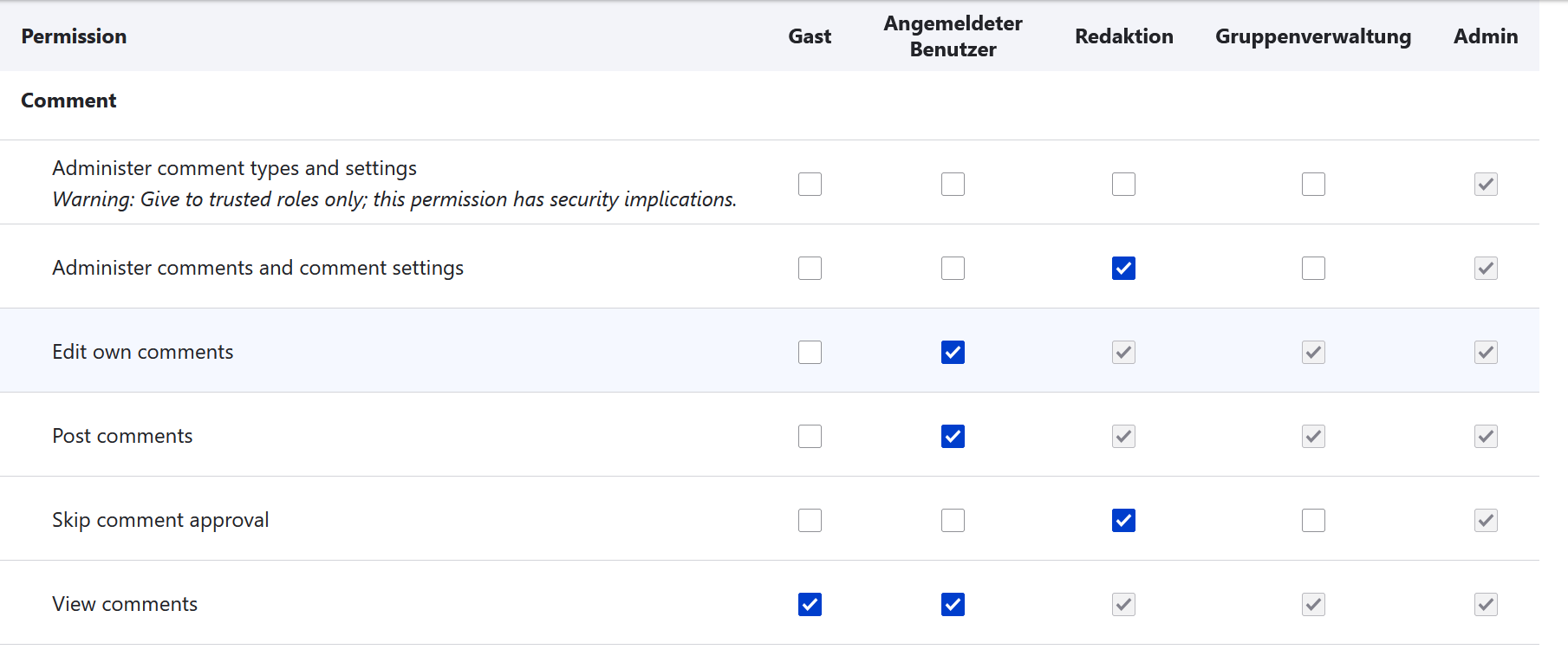
In the example image above, Admins possess all permissions. These settings cannot be changed, as indicated by the grey checkmarks. For most other permissions, you can use the blue checkmarks to freely determine which roles receive specific access or editing rights. Not every permission is appropriate for every role. Warning notices under the permissions help in deciding which rights should only be assigned to trusted roles.
Under Roles, additional roles can be defined and existing roles can be edited.
Additionally, under Role Settings, you can select the role that will receive all permissions.