Manage Comments
On Participation Pages, visitors can leave comments. These comments can be managed editorially, approved, or deleted.
Accessing Comments
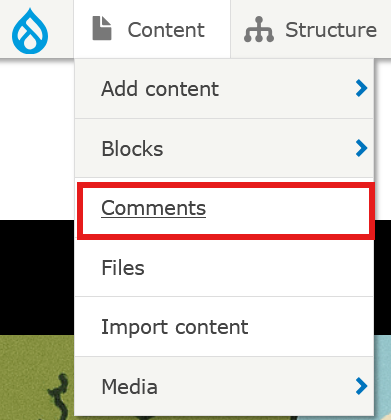
To access comments, click on Content in the main menu and then select the Comments tab.
The Unapproved comments tab in the comment view allows you to view all posts that have not yet been published.
The overview lists all comments with the following information:
- Subject of the comment
- Author: Name of the author
- Created in: The page where the comment was created
- Creation date or modification date
Moderating Comments
The following actions are available via the Edit button in the Operations column:
- Edit: Change or supplement the comment content
- Delete: The comment is completely removed
Additionally, you can manage one or several comments at the bottom of the page using the following options:
- Publish Comment: Makes the comment publicly visible or removes it from the public site.
- Delete Comment: The comment is completely removed.
To edit multiple comments at once:
- Check the boxes for the desired comments
- Select the desired action from the Action dropdown menu at the bottom of the page
- Click Apply to selected items
Filtering Comments
To find specific comments, you can filter by Subject, Author Name, and Language. Then, click on Filter.
Note regarding unapproved comments: Unapproved comments are not visible to website visitors. They serve as a preliminary review for the editorial team. The comment will only appear on the page once it has been published.